Claude Beacon

A long, long time ago kids, Claude Code didn’t have an interface: no window, no status, nothing. Just a terminal, a blinking cursor, and pure faith that something was happening on the other end.
You’d kick off a task, tab away to do something else, and then just… guess. Is it done? Did it hit a permission prompt ten minutes ago? Is it still thinking, or did it silently crash? The only way to know was to go look. I did that constantly. So I built Claude Beacon.
before it had a GUI
Claude Code is a lot more mature now. The desktop app gives you a proper UI, you can see it working, and it feels like a real tool. But for a while, all of that ambient awareness had to be built from scratch. Claude Beacon was my answer to that.
It lives in your menu bar: no window, no dock icon, no dashboards, just a tiny beacon that tells you exactly what Claude is doing, right now, without you having to switch context to find out.

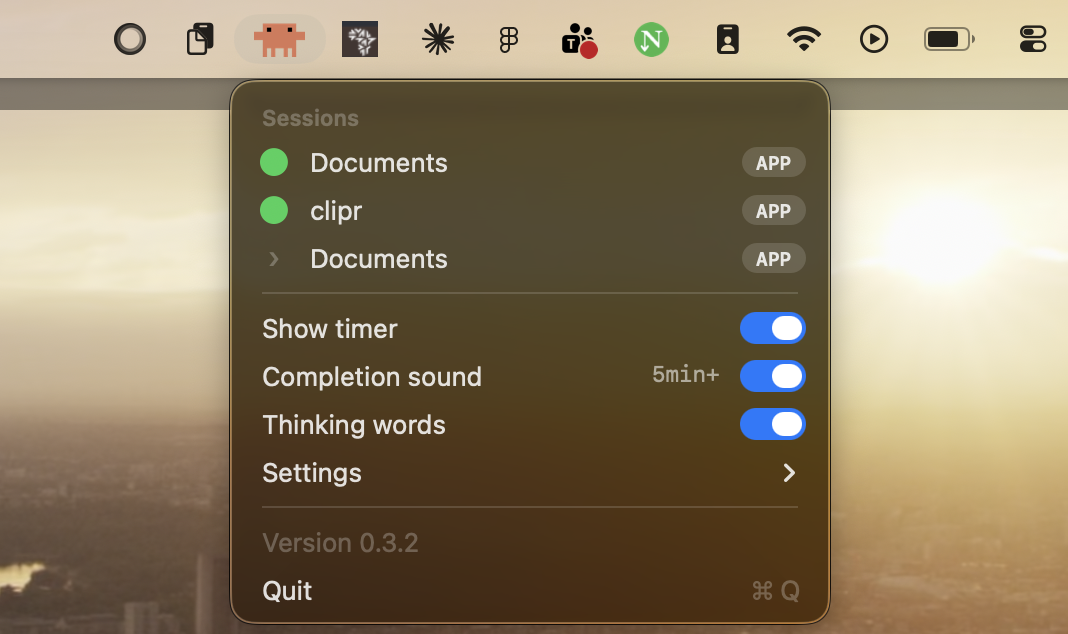
what it shows
- Animated Claude spark + live elapsed timer while Claude is working
- Short tool label: Editing, Reading, Running command, Browsing web…
- Yellow dot when awaiting permission, works in both CLI and Desktop app
- Static Claude logo when idle or done
- Token usage in the menu: last turn, session total, and approximate cost
- Context window bar showing how much of the 200k you’ve used
- Optional completion chime when a long turn finishes
- Once-a-day update check with a one-click link when a new version is out
animation styles
- Claude Spark: the morph animation from claude.ai, rasterized frame by frame
- Claude Code: the terminal glyph spinner: ✻ ✽ ✶ ✳ ✢
- Crab Walking: a pixel-art Clawd crab scuttling across your menu bar
Color modes: Orange (Anthropic’s #d97757) or System (adaptive black/white that matches your other menu bar icons). All preferences are persisted. Set it once and forget it.
how it works
Claude Code fires hooks on its lifecycle events. Small Node.js scripts write the current status to ~/.claude/statusbar/state.json. The menu bar app polls that file and renders the spark, label, timer, and usage stats.
SessionStart and SessionEnd hooks launch and quit the app automatically. The installer merges hooks into ~/.claude/settings.json without touching your existing config, and finds Node even if you use nvm, fnm, or Volta.
where it works
- Claude Code CLI (
claudein terminal) — fully tracked - Claude Code Desktop (Code tab) — fully tracked
- Claude Desktop Chat tab — not tracked (no hooks)
- Cowork / IDE extensions — not tracked
The permission dot previously only worked in the CLI. It now also fires from the PermissionRequest hook, so the yellow dot lights up in the Desktop app the moment Claude is waiting on you to approve a tool.
installing it
Download the DMG, drag it to Applications, launch it once. On first launch it automatically wires up the Claude Code hooks. Start a new session and the beacon appears. Signed and notarized. No Gatekeeper warning, no right-click needed.
Download Claude Beacon →
There’s also a Claude Code plugin install: /plugin marketplace add Gikunjuu/claude-beacon. Uninstalling is a single command that removes only the beacon’s hooks, leaving everything else in your settings untouched.
View on GitHub →

what i’d take from it
It’s a tiny app. One job: tell me what Claude is doing, without me having to go look. That clarity of purpose made every decision obvious: no feature creep, no configuration hell. The constraint made it sharper.
I shipped it fast, kept iterating, and the Claude Code community picked it up quickly. That was a good reminder that the smallest tools sometimes get the warmest reception. People notice when something solves an exact problem they already have.
My own bar for it was whether I still caught myself switching back to the terminal just to check on a task. Once the beacon actually worked, I stopped doing that within a day, which told me more than any usage number would have.