Scalpel

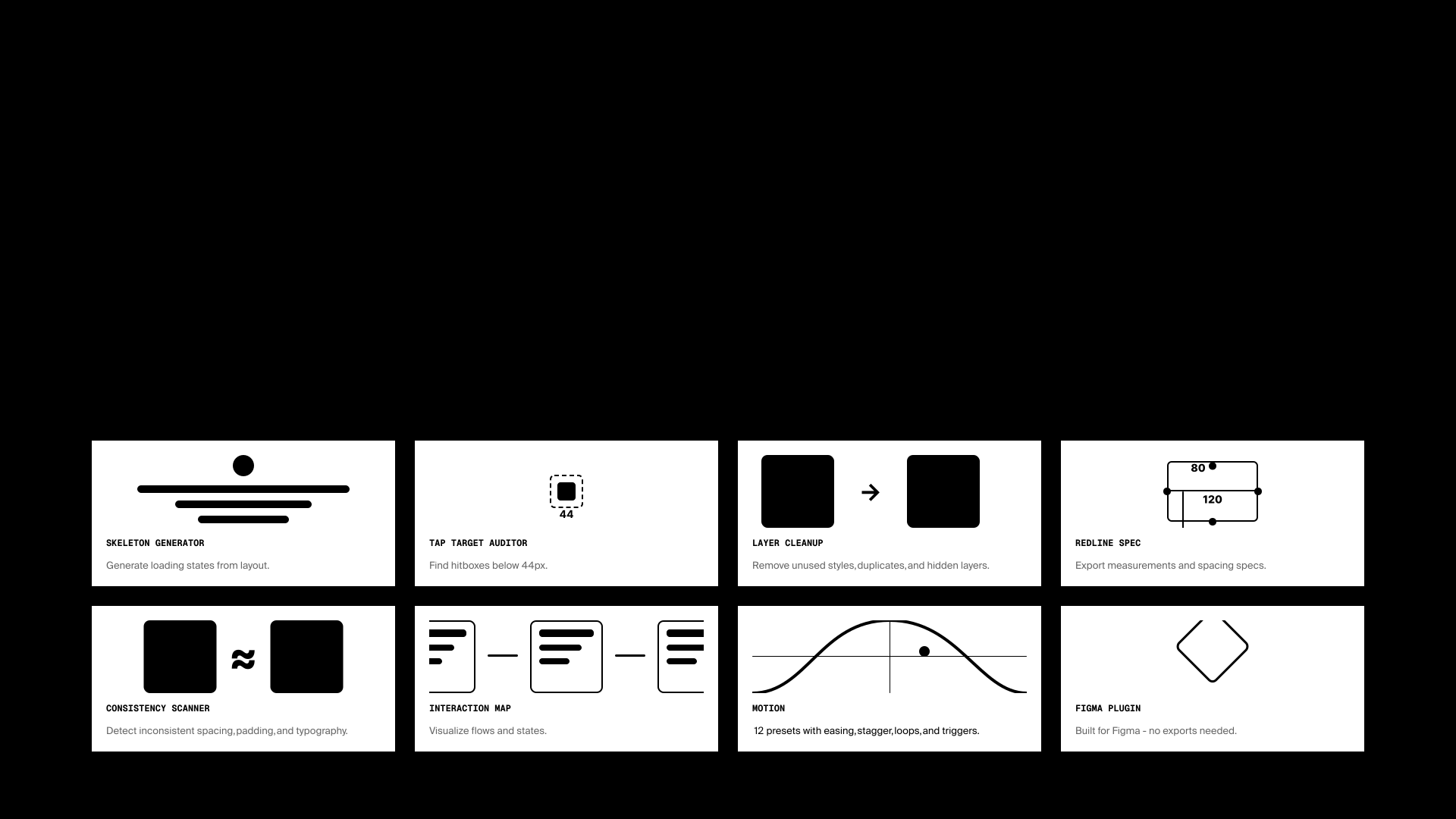
Handoff QA was always the part of design work that felt like it shouldn't exist. Checking tap targets. Making sure spacing was consistent. Building skeleton states from scratch the morning the developer needed them.
I kept doing those checks manually, late, and incompletely. Built Scalpel so I could run one scan and get everything at once. It's grown into seven tools since, but the goal hasn't changed: nothing slipping through before a design leaves my hands.
motion
Every other tool in Scalpel catches a mistake. Motion is the one that adds something: entry animations, hover states, staggered reveals, using Figma's own Motion feature instead of a workaround built outside it.
It's built for the designer who's never opened Figma Motion before as much as the one who has. Someone who'd normally skip animation because the easing and timing controls are unfamiliar can get something real applied in the time it used to take to find the right panel.
Pick a preset and it plays on the canvas before you've touched the real layer, so you're not guessing what "ease out" looks like from the name alone. Twenty-five presets, twelve easing curves, and it writes straight into Figma's own animation styles, the same system Figma Motion itself runs on, not a CSS overlay sitting on top of an untouched file.
skeleton generation
Skeletons were always the last thing I'd build. Not because they were hard, just tedious. Create a copy, strip everything, replace fills with grey rectangles, manually match every shape.
Scalpel classifies every element in your selection, text, images, containers, buttons, and generates a skeleton beside your original in one click. Structure stays intact, content gets swapped out.
tap targets
The WCAG minimum for touch targets is 44x44px. Sounds obvious until you're three weeks into a design and half your interactive elements are 32px because that's what the icon was.
It walks the frame, figures out what's interactive, and flags anything below the threshold. One scan to know exactly what needs fixing before it reaches a developer.
cleanup
Every file accumulates layers that used to matter and don't anymore. A hidden frame from three iterations ago. A group wrapping a single child for no reason left over from a copy-paste.
Cleanup finds hidden layers, empty frames, and unnecessary nesting, and shows you the list before it removes anything. Nothing gets deleted without you seeing it first.
redline specs
Handoff specs used to mean screenshotting a frame and manually labeling every dimension in FigJam, or telling a developer to "just check the file" and hoping they clicked the right layer.
One click generates an annotated overlay: dimensions, spacing, padding, font specs, with label placement solved so nothing sits on top of the thing it's describing. Filter it down to one color or one spacing value when that's the only thing actually wrong.
consistency scanner
Near-miss inconsistencies are the ones nobody catches. A color a shade off, a font size one pixel from its neighbor, a corner radius that almost matches. Nothing looks broken until two screens sit side by side.
It scans a selection, clusters the near-duplicates, and checks them against your actual paint styles, text styles, and variables. One click applies the real style instead of leaving you to guess which of six similar blues was the intended one.
flow map
Prototype flows get hard to hold in your head past a handful of screens. Figma's own prototype view is built for editing connections, not explaining them to someone else.
Flow map scans every prototype connection on a page and lays it out as a diagram: screens arranged by depth, connectors colored by trigger type, dashed lines for overlays. It's the thing I hand a developer instead of describing the flow out loud.
measuring it without a funnel
There's no analytics pipeline behind a plugin built by one person. No funnel, no data partner, no dashboard to check on a Monday. That doesn't mean there's no bar, just that I had to pick one on purpose instead of reading it off a chart.
The success measure I settled on: whether Scalpel catches something in my own files that I would have shipped without it. It has, more than once, which is the only test that means anything for a tool built to catch your own mistakes.
That's also why an icon insertion feature that shipped early got cut. It worked fine, but it had nothing to do with catching handoff mistakes, and every feature that isn't in service of the actual job makes the ones that are harder to find.
The guardrail was the opposite risk, false positives on the tap target heuristic. A plugin that flags things that aren't actually broken gets ignored, then uninstalled, so tuning the classifier to stay quiet on ambiguous cases mattered as much as catching real ones.
Motion got its own version of that measure: how fast someone who'd never animated anything before could get a real animation applied using Figma's own motion system, not a workaround sitting outside it. If that took longer than picking a preset and watching it play, the tool wasn't doing its job.
what i'd take from it
The harder design problem wasn't what to audit, it was when to stop. There's always one more thing you could check. I kept trimming it back to the things that actually caused problems in practice, not the things that felt thorough on paper.
The tap target heuristic took the most iteration. Figma doesn't expose intent, it doesn't know if something is a button, so the classifier has to infer it from name, type, and structure. Motion had its own surprise. Figma's own reaction validator rejects a field its type declaration says is required, so the fix was omitting it and trusting the runtime over the types.